
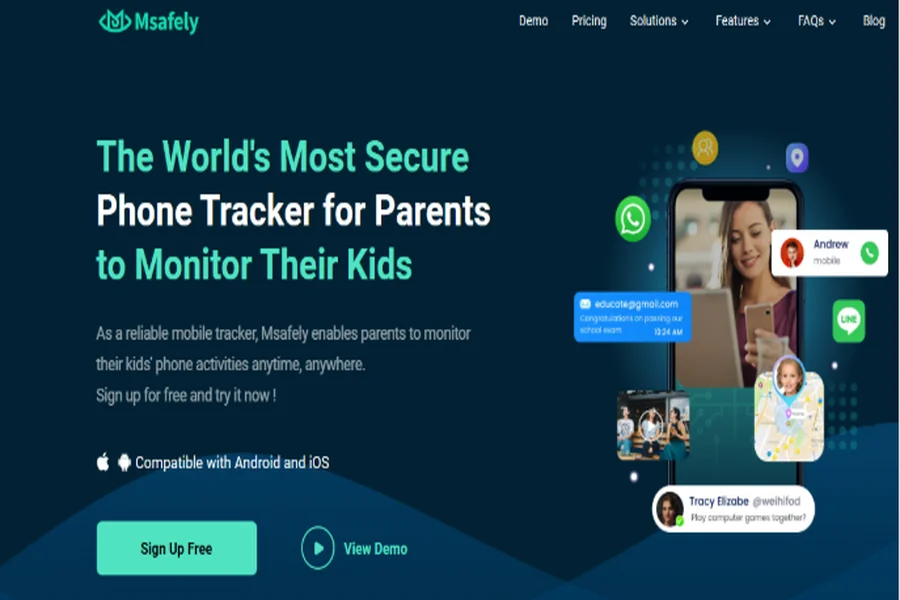
Today’s digital environment presents new challenges for parents looking to monitor their children online and protect them from online dangers. The role of a smartphone is ever-growing as a vital part of many teenagers’ lives, and the availability of effective and trustworthy parental control solutions is extremely important. Luckily, Msafely has emerged as a solution that embraces technology and user design to improve on traditional parental control solutions.
In this review, we will share our analysis of Msafely, assessing the features, product performance, and distinct aspects of the Msafely software in the parental control arena. We will discuss how Msafely is paving the way for new and innovative techniques in monitoring behaviors, but also giving parents thoughtful means to protect children in an online world.
What is Msafely?
At $49.98 per month, Msafely is a new generation phone monitoring app for parents that improves parental controls while emphasizing usability. While other monitoring solutions force parents to wrestle with cumbersome installations and require physical access to devices, Msafely leverages advanced cloud technology to simplify the entire monitoring process.
The platform includes complete tracking capabilities across all device types, with a particularly strong Android monitoring capability which allows parents to gain real-time oversight into their children’s devices in multiple areas, including messaging, social media, location tracking, and app usage – all from a single dashboard.
No-Installation Monitoring
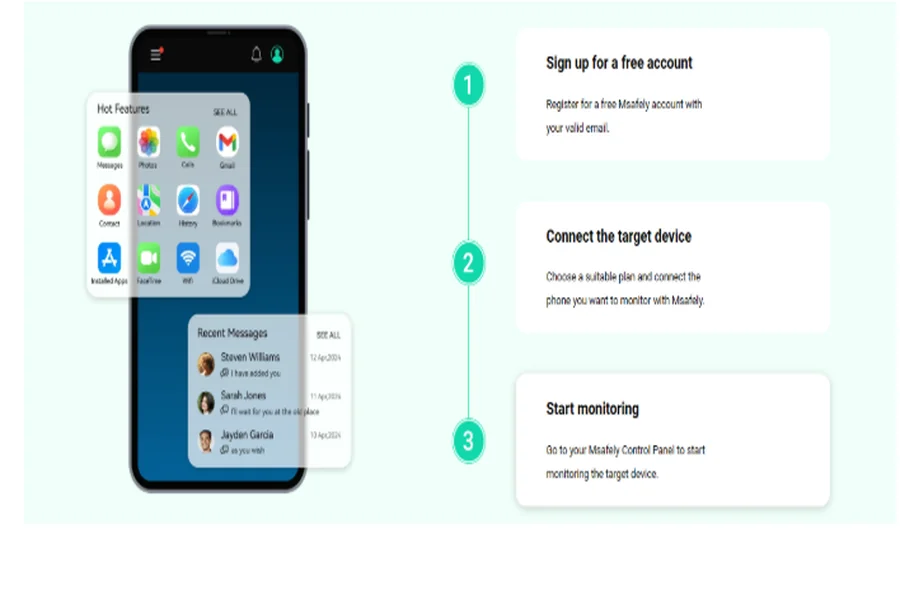
Traditionally, device monitoring requires some sort of application to install and set up on the device. This is what makes Msafely’s technology unique, as it allows monitoring technologies that do not have traditional application installations. Installations are often the technical barrier that parents are not able to overcome when it comes to implementing any sort of monitoring solution successfully. With the cloud-based design, parents can start monitoring devices within minutes of deciding, versus the hours or days it might take other solutions.
Set Up: iPhone vs Android
iPhone Setup Process
The Msafely iPhone setup process is a very simple iCloud-based approach for parents to obtain monitoring capabilities by just using the target device’s iCloud username and password. The total process will usually take less than 5 minutes from the point the parent creates their account to actually being able to actively monitor their child’s device.
The iCloud method automatically syncs all data, thus anything that parents receive in terms of device usage information is as up-to-date as possible. Once a parent fully completes the setup process, they will never have to physically access the device again, which is ideally suited for parents or guardians who want to monitor a child and do not want to make the child aware that monitoring is present on the device.
Setting Up on Android
There are many ways to set up Msafely, and Android users benefit from the most flexible options. The Google Cloud method is the easiest because it primarily requires the Google account information used on the device. The ease and structure of the Google Cloud method will be very similar to the iPhone setup process since there is no app to download.
For those parents wishing to install the app in more traditional ways, the APK option is still available. This would include downloading and installing the Msafely app directly on the target device. The APK method will allow Msafely direct access to the device to perform functions, and more extensive monitoring.
Feature Comparison Table
| Feature Category | iPhone (iCloud Method) | Android (Google Cloud) | Android (APK Method) |
| Setup Time | 2-5 minutes | 3-5 minutes | 5-10 minutes |
| Physical Access Required | No | No | Yes (initial setup) |
| Invisible Monitoring | Yes | Yes | Depends on settings |
| Text Messages | ✓ | ✓ | ✓ |
| Call Logs | ✓ | ✓ | ✓ |
| Social Media Monitoring | ✓ | ✓ | ✓ |
| GPS Location | ✓ | ✓ | ✓ |
| Web Browsing History | ✓ | ✓ | ✓ |
| App Usage Statistics | ✓ | ✓ | ✓ |
| Real-time Alerts | ✓ | ✓ | ✓ |
| Geofencing | ✓ | ✓ | ✓ |
| Photo/Video Access | ✓ | ✓ | ✓ |
| Remote Control Features | Limited | Limited | Full |
Advanced Monitoring Features
Location Tracking
In addition to its location tracking capabilities, Msafely helps parents take location to a new level with the information that it is collecting in order to maximize location intelligence. Parents have access to their child’s location history, which allows them to identify where their child has been throughout the day.
Geofencing
Parents can create geofence alerts that establish location boundaries with the child’s safe and unsafe destinations. Parents are able to create alert boundaries around home, school, or friends’ houses. The alerts let them know when their child arrives or departs an area, which can provide parents with peace of mind when managing their child’s daily activities.
SMS Monitoring
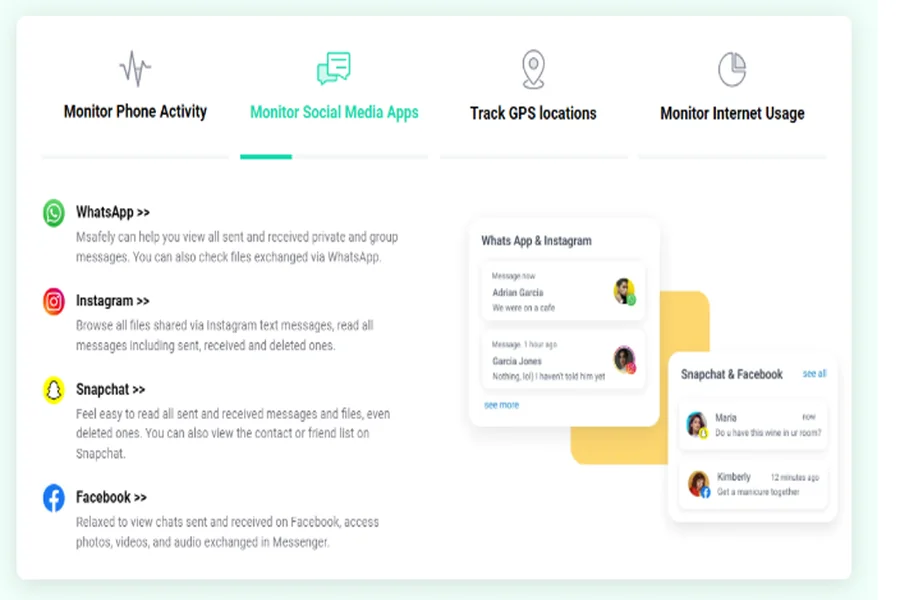
The text message monitoring feature includes SMS and popular messages app access, too, so monitoring conversations includes seeing the full social picture with regard to the style of communications. Parents can see their kids’ messages along with the timestamps to be aware of their child’s social activities, and any other factors of risk and concern.
Social Media Monitoring
Social media monitoring is perhaps one of Msafely’s most valuable features and can limit modern parents’ worries. It is the most reliable tracking app for Android in this regard. Msafely actions comprehensive activity monitoring across the major social media platforms to gather meaningful insights into the child’s digital footprint, including their posts, chats, friends’ engagements, and shared items.
Conclusion
Msafely is the future of parental control technology, offering innovative cloud-based monitoring, powerful features, and an easy-to-use design. The no-installation feature of the platform is a game-changer. If you are looking for reliable, legitimate, well-rounded parental monitoring, it does not get better than Msafely, and the performance-to-value is unmatched. As the company continues to improve the platform and offer new features, Msafely is at the forefront of parental control technology.
Frequently Asked Questions
Q: Is using Msafely legal?
A: Yes, Msafely is legal when used with a valid purpose of parental control. Parents have an absolute right to monitor their minor children’s device use, but users must ensure they are compliant with local laws and regulations regarding digital monitoring.
Q: Will my child know that Msafely is monitoring their device?
A: Monitoring is invisible to the device user when monitoring occurs in the cloud (iCloud for iPhone or Google Cloud for Android). With the APK installation method on Android, this may be apparent depending on how the device is configured and the user’s knowledge.
Q: What if my child changes their passwords?
A: If account credentials are changed, then monitoring will be suspended until the new credentials can be entered into your Msafely account. Msafely will send alerts to indicate when credential updates need to be made for monitoring continuity.